Fewer accounting surprises. More control over FlexiBee.
Check accounting data across multiple companies in FlexiBee and receive alerts about findings. Each company has its own connection and rules. With write access, Powervoicing automatically matches payments and creates recurring invoices.
An application provided as a service. Pricing follows the scope and billing model described below.
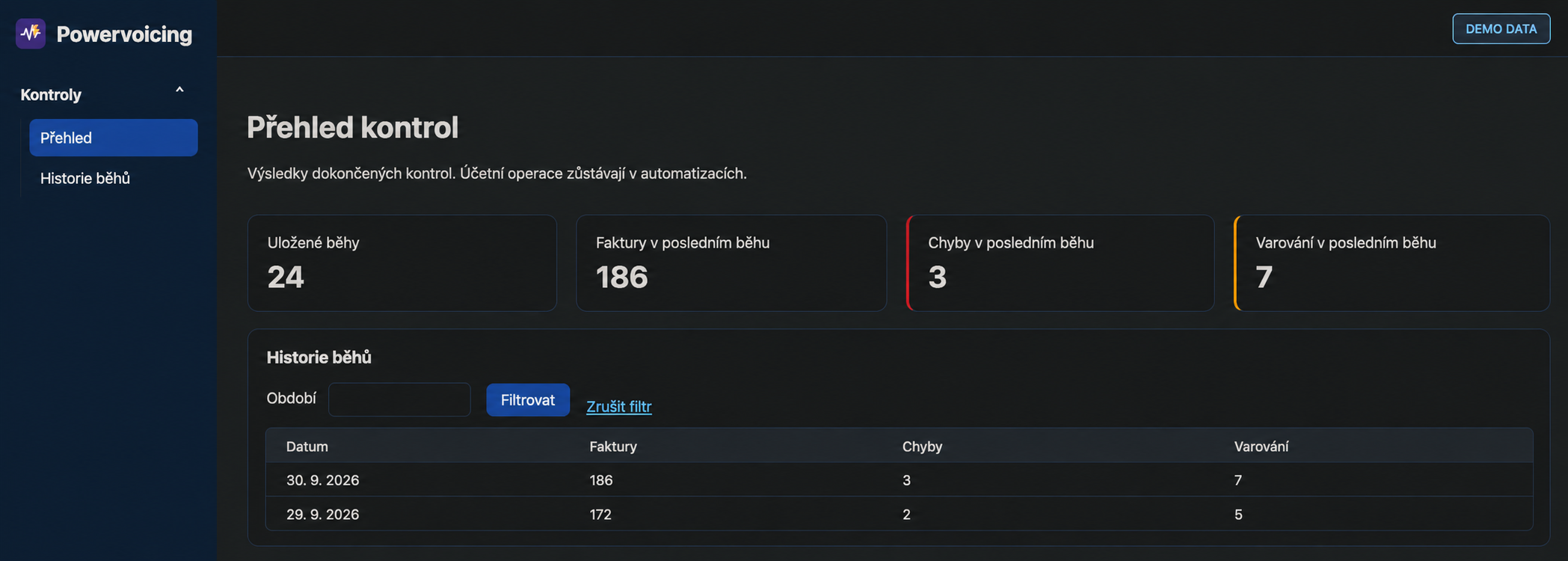
Powervoicing · checks overview and run history with illustrative demo data
Where we help
Primarily for accounting firms managing multiple clients in FlexiBee, and also individual companies with their own accounting teams.
FlexiBee holds the accounting data, but errors and exceptions become harder to find as invoice volume grows. A missing attachment, incorrect account, VAT issue, duplicate or post-close change can mean lengthy rework. Powervoicing applies agreed rules to FlexiBee data and shows the accounting team what needs review.
Powervoicing / How it helps
From FlexiBee records to a clear review list.
Missing attachments and posting discrepancies are easy to overlook among many invoices.
HOW IT WORKSPowervoicing
INPUT
FlexiBee
Invoices and related accounting data
⚡PROCESSESPowervoicingAutomated checks · Findings
OUTPUT
Accountant’s review
Assessment and any required correction
↗
WHAT YOUR TEAM GETSAccountants see which documents need attention and why.
Read-only checks do not change data. With write access, payment matching and recurring invoice creation run automatically. Teams or Slack alerts link to Powervoicing; email notifications are planned.
Benefits for your team
Fewer handovers. Better visibility.
01
Received-invoice checks
Checks attachments, invoice type, accounts, VAT and control-statement rows, payment details and relationships between invoice lines.
02
Duplicates and unusual invoices
Compares suppliers, payment references, amounts and up to 24 months of history. Flags duplicates and values outside the normal pattern.
03
Closed periods under control
Detects invoices added, removed or changed after an accounting or tax close, and checks taxable supply dates on issued invoices.
04
Bank-payment matching
In the agreed mode, downloads bank statements and matches only exact variable-symbol and amount pairs. Ambiguous cases remain with the accounting team.
05
Contract invoice generation
Can regularly trigger invoice generation from active customer contracts in FlexiBee and report the outcome.
06
Checks without changing accounting data
Read access is used for checks and alerts. Write automations are configured separately and then run automatically without approval for each run.
07
Notifications where you work
Microsoft Teams or Slack webhooks link to findings in Powervoicing. Email notifications are planned.
08
Pricing by companies and features
The subscription depends on connected companies and enabled modules. Scope and pricing are agreed in the proposal.
09
Invoice creation today
Automation currently creates invoices in FlexiBee. Sending them to customers is not enabled as standard; availability and configuration are assessed individually.
10
21 available checks
Checks cover documents, attachments, accounting entries, VAT, duplicates and post-close changes. See the complete list and individual rules below.
Sample output
The document, the finding and the context for review.
One run turns hundreds of invoices into a short prioritised list. Every finding explains what does not match, why it matters and what the accountant should review.
RECEIVED-INVOICE CHECK · 08 / 2026Run completed · 4 min ago
01needs correction
03needs review
126no finding
Needs correction
An attachment is missing and the posting does not match the purchase purpose
Received invoice #2026-08173 · CZK 24,990
Review the attachment and posting rule →
Needs review
VAT and the control-statement row differ from the supplier’s usual pattern
Received invoice #2026-08166 · CZK 8,470
Compare the invoice and confirm its VAT treatment →
Information
The invoice has a taxable-supply date in a closed period
Received invoice #2026-08009 · CZK 3,210
Decide the next accounting step →
Illustrative output without accounting data. Rules, priorities and alert recipients are configured around your company process.
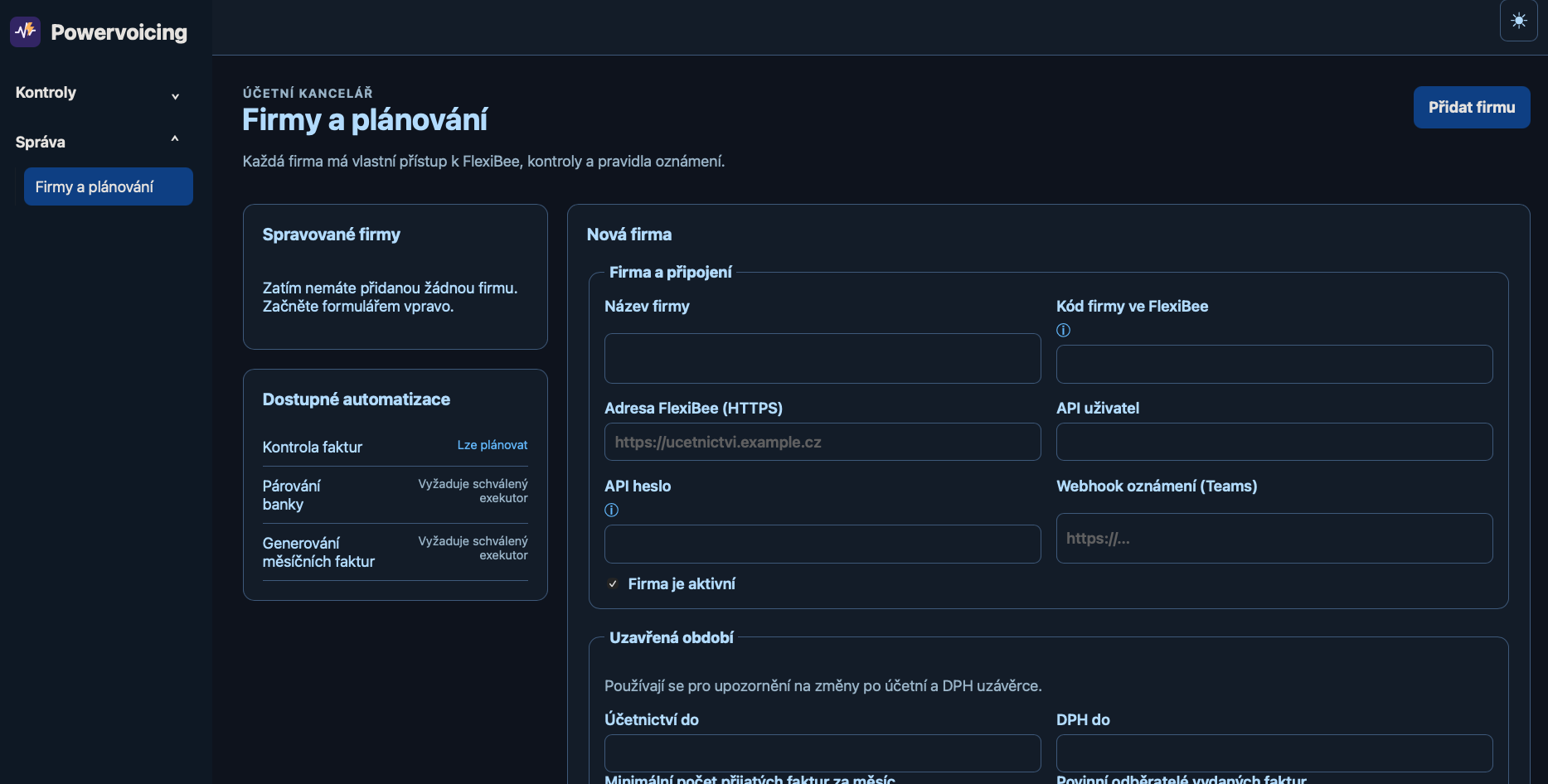
POWERVOICING / COMPANY SETUP
Each company has its own setup.
This is the setup for a new company: its FlexiBee connection, available automations and closed periods to watch for changes.
Actual application screen. The form is empty and contains no credentials.
POWERVOICING / FLEXIBEE
What Powervoicing checks in practice.
All 21 checks are available. Read-only checks report findings without changing data. Separate write access enables automatic payment matching and recurring invoice creation without approval of each run.
01
Account by purpose
Reviews the account used against the document’s purpose.
02
Document attachment
Flags missing attachments.
03
Attachment amount
Compares the attachment amount with document data.
04
VAT on benefits
Checks VAT settings for benefits.
05
Closed accounting period
Flags documents in a closed accounting period.
06
Changes after close
Identifies changes after an accounting close.
07
Closed VAT period
Checks documents against closed VAT periods.
08
VAT control statement row
Reviews the document’s control statement classification.
09
Document description
Checks descriptions against configured rules.
10
Identical invoice
Flags matching invoices for review.
11
Previous-year changes
Flags changes to previous-year documents.
12
Historical deviation
Compares with historical posting patterns.
13
Invoice type
Reviews the selected invoice type.
14
Debit and credit posting
Checks debit and credit posting.
15
Monthly invoice count
Checks invoice counts against company settings.
16
Payment account
Reviews payment account information.
17
Reverse-charge type
Checks the selected reverse-charge treatment.
18
Similar invoice
Flags similar documents for manual review.
19
VAT row
Reviews the document’s VAT row.
20
Invoice and tax-point dates
Checks the relationship between invoice and taxable-supply dates.
21
Required issued invoice
Flags a missing expected issued invoice.
Getting started
From a demo to your team’s daily work.
We show you the application and review the settings and connections to your systems. Together we agree the scope, billing model and team training.
01Select the company, period and accounting processes
02Set access and approved automations
03Validate rules in a test period
04Connect reports and hand over the operating procedure
Availability and billing
For accounting firms managing multiple clients and individual businesses. Pricing depends on connected companies and enabled modules; packages are specified in the offer. Teams and Slack alerts link to Powervoicing. Email is a planned extension. Invoices are currently created automatically in FlexiBee; sending them to customers is not part of current operation.
Support is provided in Czech and English. Source code remains with Connectica; you receive an export of your data when the service ends.
CONNECTICA / Powervoicing
Let us review one FlexiBee accounting process that takes too much of your team's time.